






1 SoapySDR Introduction
1.1 Overview of SoapySDR
SoapySDR is an open-source, vendor-neutral Hardware Abstraction Layer (HAL) and API framework designed for Software Defined Radio (SDR) devices. It provides a unified interface between SDR hardware and upper-layer applications, allowing users to operate SDR devices from different manufacturers through the same software architecture.
Traditionally, each SDR manufacturer provides its own hardware control interface. Applications developed based on one vendor’s API are usually difficult to migrate to another device. SoapySDR solves this problem by introducing a standardized hardware abstraction layer.
With SoapySDR, applications only need to interact with the unified SoapySDR interface, while different SDR devices are supported through corresponding device driver modules. This architecture enables software applications to be independent of specific hardware platforms.
1.2 SoapySDR Architecture
The SoapySDR framework consists of four main layers:
Application Layer
The application layer includes upper-level SDR software, such as GNU Radio, Gqrx, welle.io, or custom signal processing applications. These applications communicate with SDR hardware through the standardized SoapySDR interface without requiring knowledge of specific hardware implementations.
SoapySDR Standard Interface Layer
The SoapySDR framework provides a unified hardware abstraction interface for SDR devices. It defines standardized APIs for common operations, including:
- Device discovery and connection
- Frequency configuration
- Gain adjustment
- Sample rate and bandwidth setting
- IQ data streaming
SoapySDR Driver and Device API Layer
Each SDR manufacturer provides a corresponding SoapySDR driver module. The driver converts standardized SoapySDR commands into device-specific API calls, enabling communication between the SoapySDR framework and the hardware device.
Hardware Device Layer
The hardware device layer consists of the physical SDR hardware. It performs RF signal reception, frequency tuning, data sampling, and IQ data transmission according to commands received from the device API.
2 How to Use HAROGIC Receivers in SoapySDR
The SoapyHarogic module acts as a bridge between the SoapySDR framework and HAROGIC HTRA API. It translates standardized SoapySDR commands into HAROGIC-specific API calls, enabling SoapySDR-compatible applications to control HAROGIC receivers and acquire IQ data.
2.1 Operation Steps
This section describes how to install and verify the HAROGIC SoapySDR environment on Ubuntu 22.04 or later. GNU Radio 3.9 or later is used as the upper-layer application in the following example.
- Architecture: x86_64
- Operating System: Ubuntu 22.04 or later
- GNU Radio Version: 3.9 or later
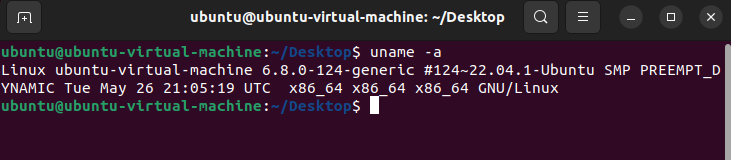
Enter uname -a in the terminal to check whether your operating system and architecture meet the requirements for running the HAROGIC spectrum analyzer in GNU Radio. If they do not, please update to the required versions.
uname -a
Step 1: Configure Virtual Machine USB Settings
Before starting the configuration, please ensure that both the USB cable and the port support USB 3.0, and then change the virtual machine settings to USB 3.1/3.2.
VM > Settings > Hardware > USB Controller > USB Compatibility > USB 3.2
Step 2: Install the HAROGIC SoapySDR Support Package
GitHub link: https://github.com/HAROGIC-Technologies/soapy-htra
Download the soapy-harogic compressed package from GitHub and copy it into the Ubuntu 22.04 system. Extract the compressed package, and place the device calibration files in the CalFile folder.
Return to the extracted directory, open a terminal, and run the following commands:
chmod +x install.sh
sudo ./install.sh
Step 3: Verify the Installation
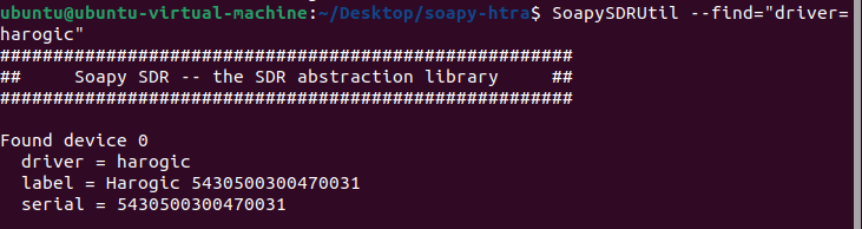
This command verifies that the HAROGIC receiver has been registered as a SoapySDR device through the soapy-htra driver:
SoapySDRUtil --find="driver=harogic"
Step 4: Install the WLAN Demodulation Dependencies
Download and compile the libraries required for WLAN signal demodulation. Open a terminal in the soapy-harogic/soapy-htra/examples/WLAN directory and run the following commands:
chmod +x install_wifi.sh
./install_wifi.sh
Step 5: Install and Run ADS-B Demodulation
Download and compile the libraries required for ADS-B signal demodulation. Open a terminal in the soapy-harogic/soapy-htra/examples/ADS-B directory and run the following commands:
chmod +x install_adsb.sh
./install_adsb.sh
After the installation is complete, open a terminal and run the following commands to start the ADS-B web server:
cd ~/Desktop/soapy-harogic/soapy-htra/examples/ADS-B/gr-adsb/web
source venv/bin/activate
python3 webserver.py
Then open the following URL in a web browser to display the ADS-B map: http://127.0.0.1:5000
2.2 Application Examples
The SoapySDR framework enables GNU Radio to access HAROGIC receivers through a standardized interface. Depending on the signal processing modules used, a wide range of RF signals can be received, analyzed, and demodulated, including:
- Custom SDR Applications: Spectrum monitoring, IQ recording, signal analysis, and user-defined signal processing
- Analog Signals: AM, Narrowband FM (NFM), Wideband FM (WFM), and CW
- Digital Modulation Signals: FSK, PSK, QPSK, QAM, and other digital modulation formats
- Wireless LAN Signals: WLAN (IEEE 802.11)
- Aviation & Marine Signals: ADS-B
2.3.1 FM Demodulation
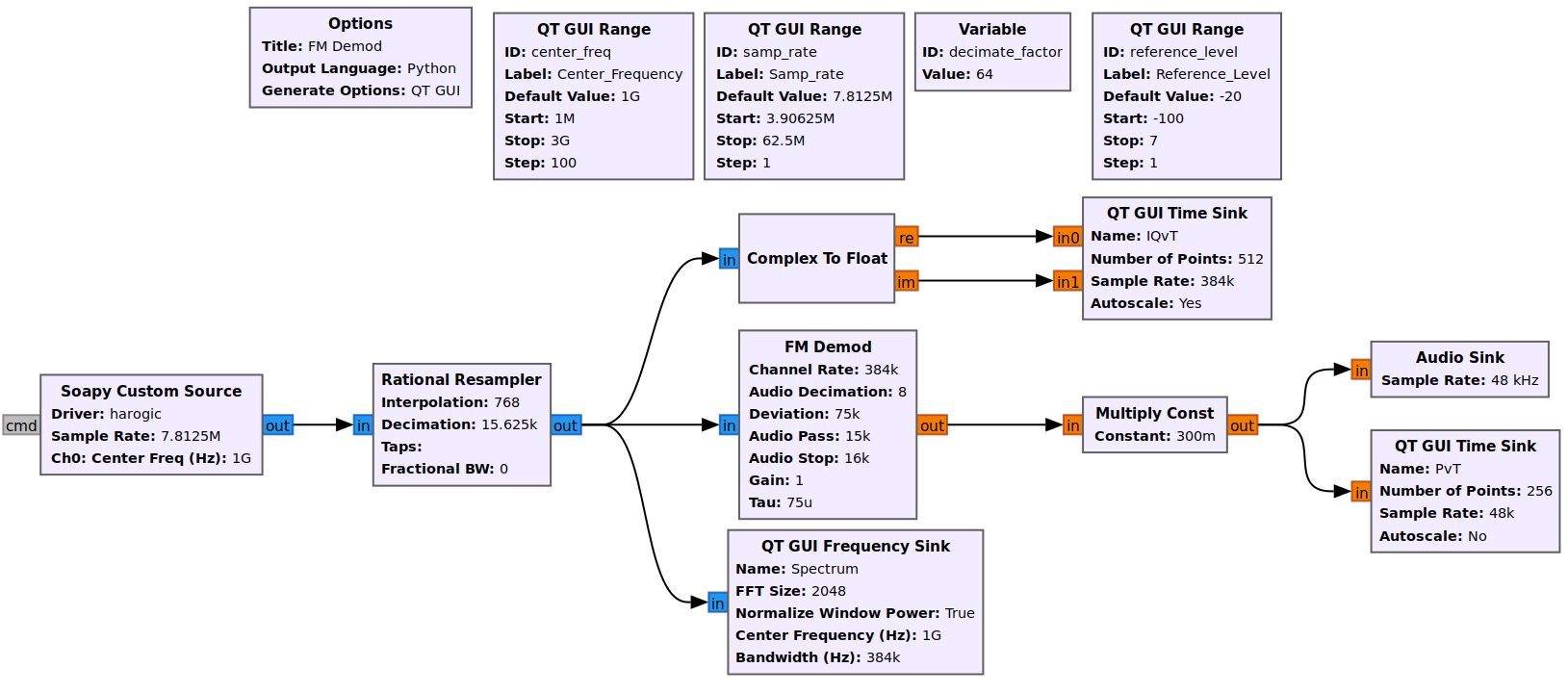
The FM demodulation flow is implemented in GNU Radio based on the SoapySDR interface. As shown, the HAROGIC receiver is used as the RF data source to acquire the IQ signal. The received complex IQ data is first processed by the Rational Resampler block to adjust the sample rate, and then passed to the FM Demod block for frequency demodulation. The demodulated signal is displayed through QT GUI Time Sink blocks, while the spectrum of the received signal is visualized using the QT GUI Frequency Sink block. The recovered audio signal is also output through the Audio Sink block for listening.
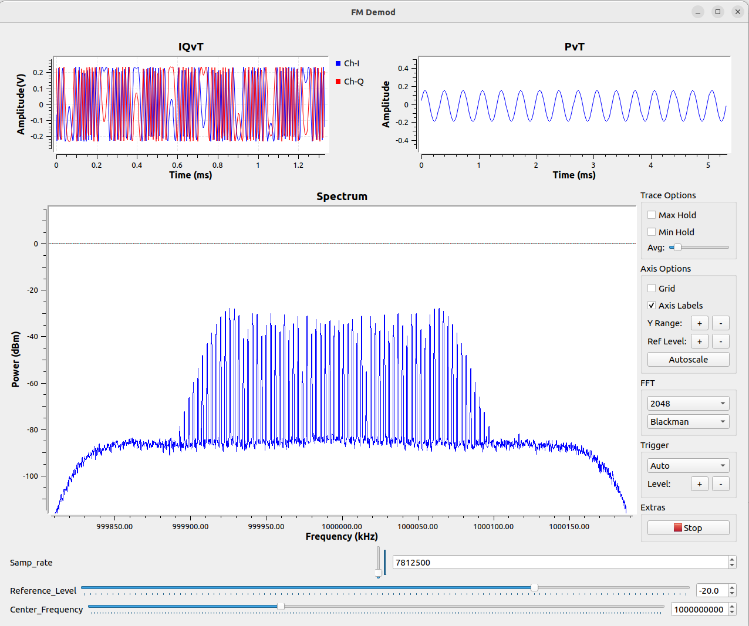
In this example, the input signal is a 1 GHz FM-modulated RF signal with a power level of -20 dBm, using a 3 kHz sine-wave modulation signal with a frequency deviation of 75 kHz. The output displays the IQ waveform, FM-demodulated waveform, and signal spectrum in GNU Radio.
2.3.2 QAM Demodulation
This example demonstrates 16-QAM signal reception and demodulation using a HAROGIC receiver integrated with GNU Radio through the SoapySDR interface. The HAROGIC receiver acquires the IQ data through the Soapy Custom Source block. The received signal is then processed by the Rational Resampler, Root Raised Cosine Filter, AGC, Symbol Sync, and DDPLL blocks to perform matched filtering, timing recovery, carrier recovery, and symbol synchronization.
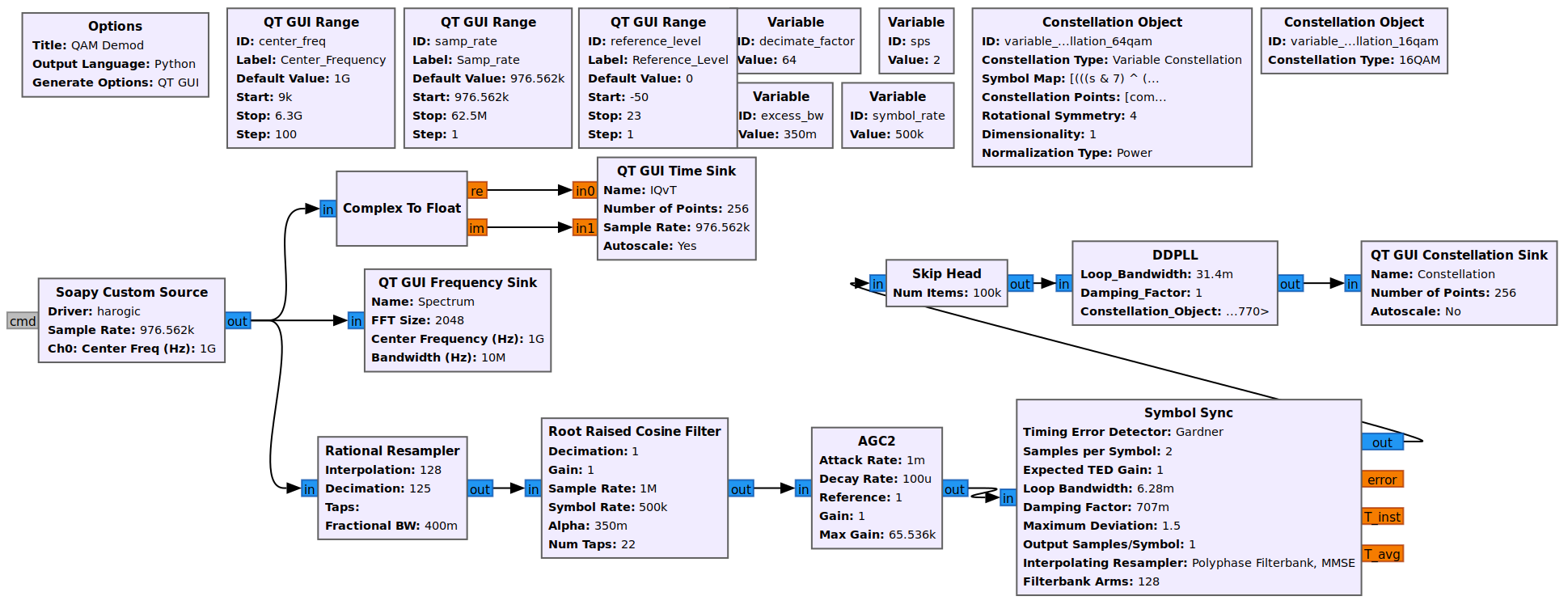
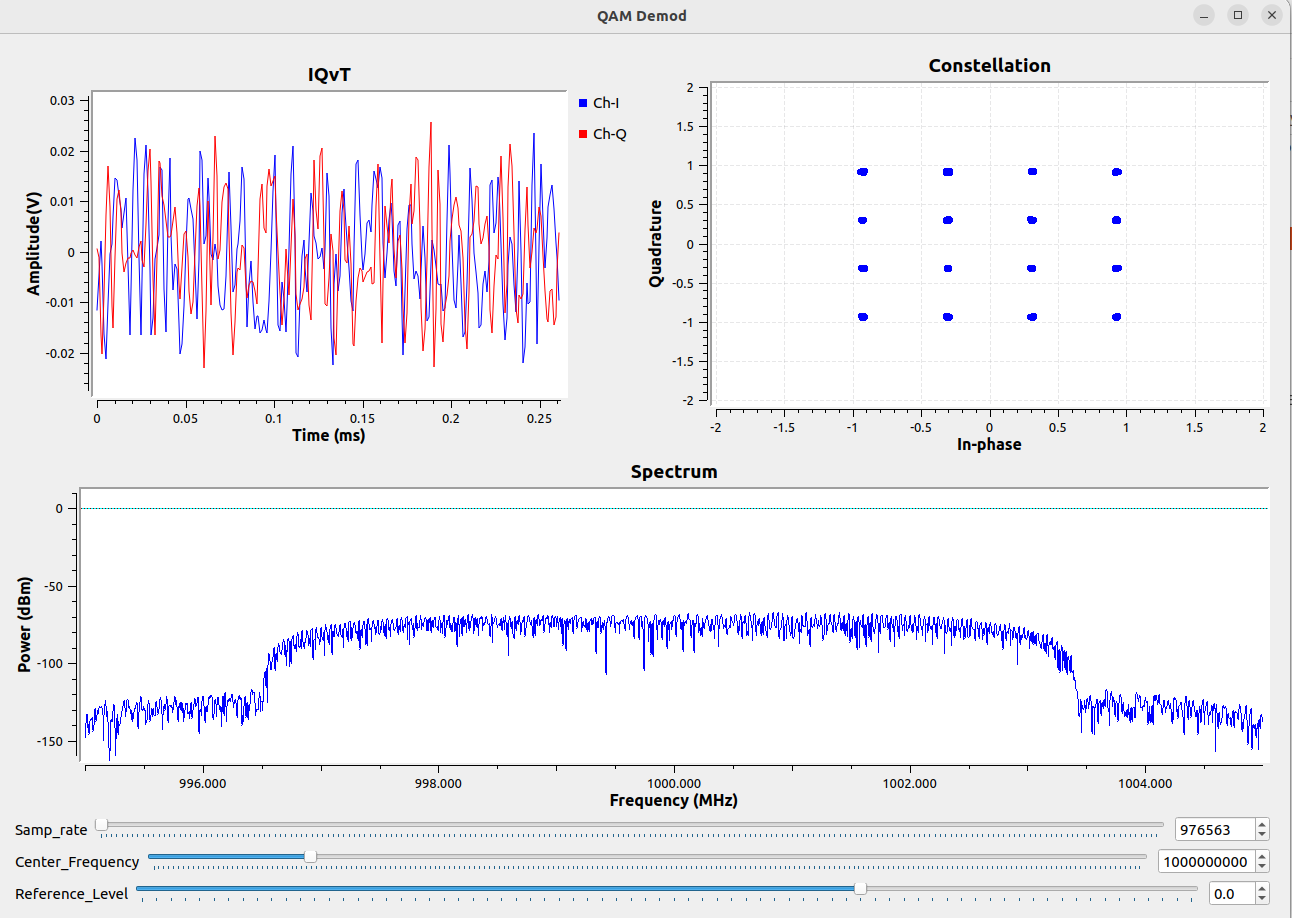
The input signal is a 1 GHz RF signal with an output power of -80 dBm, modulated using 16-QAM at a symbol rate of 500 kSymbols/s. A Root Raised Cosine (RRC) filter with a roll-off factor of 0.35 is applied for pulse shaping. The output displays the IQ waveform, signal spectrum, and 16-QAM constellation, allowing users to observe the signal characteristics and verify the demodulation performance.
2.3.3 WLAN Demodulation
This example demonstrates IEEE 802.11a WLAN signal reception and demodulation using a HAROGIC receiver integrated with GNU Radio through the SoapySDR interface. The HAROGIC receiver acquires the IQ data through the Soapy Custom Source block. The received signal is processed by the Rational Resampler, WiFi Sync Short, WiFi Sync Long, FFT, WiFi Frame Equalizer, and WiFi Decode MAC blocks to perform packet detection, synchronization, OFDM demodulation, channel equalization, and MAC frame decoding.
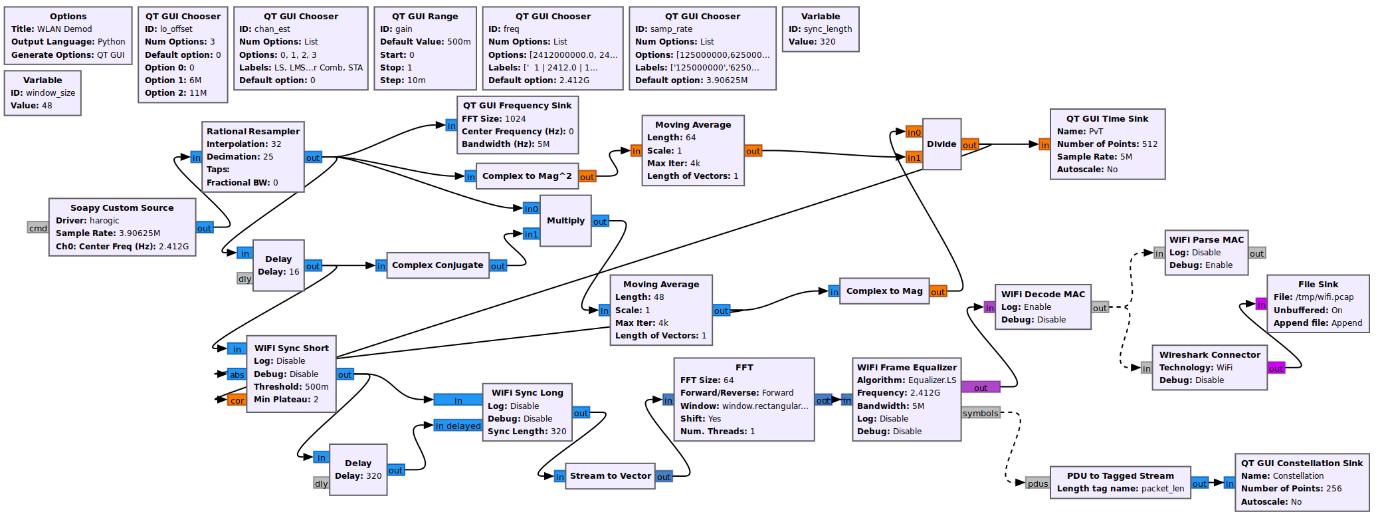
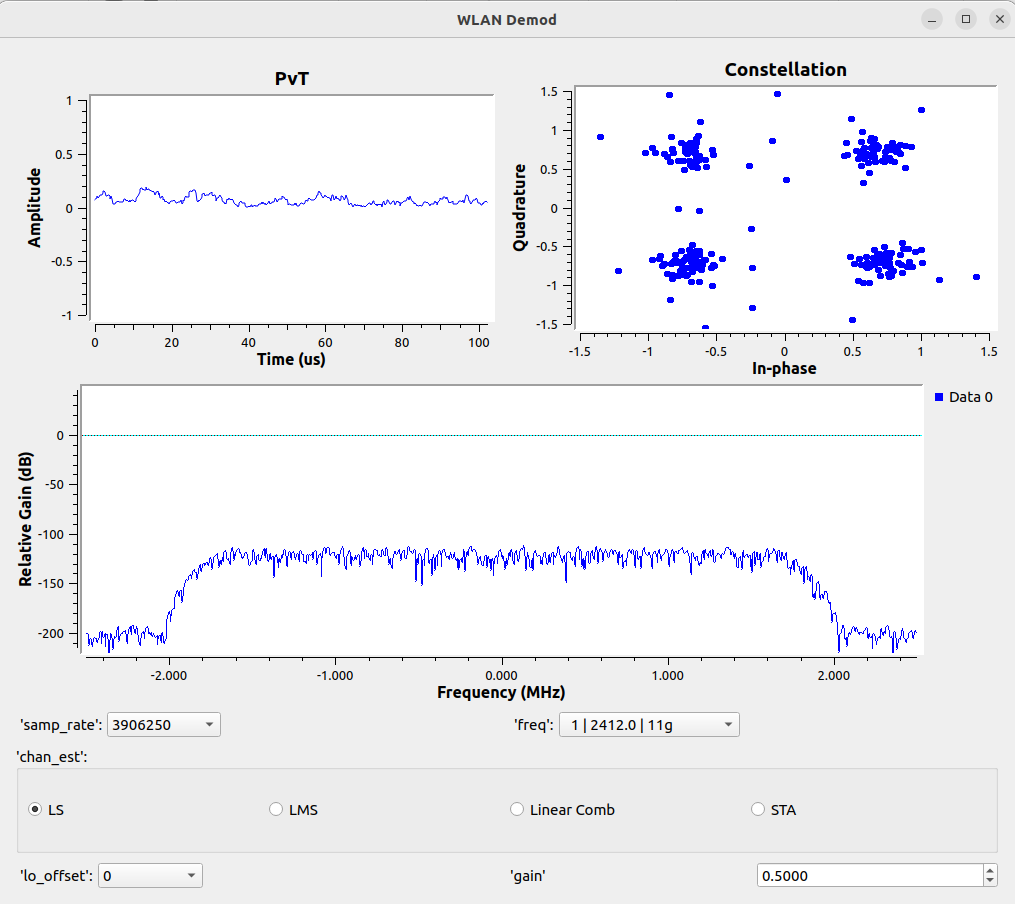
The input signal is an IEEE 802.11a WLAN signal with a center frequency of 2.412 GHz, an output power of -40 dBm, and a data rate of 12 Mb/s using QPSK modulation with BCC 1/2 coding. The output displays the signal waveform, signal spectrum, and constellation diagram, while the decoded WLAN packets are exported to Wireshark or saved as a PCAP file for further analysis.
2.3.4 ADS-B Demodulation
This example demonstrates ADS-B (1090ES) signal reception and demodulation using a HAROGIC receiver integrated with GNU Radio through the SoapySDR interface. The HAROGIC receiver acquires the IQ data through the Soapy Custom Source block. The received signal is processed by the Rational Resampler, ADS-B Framer, ADS-B Demod, and ADS-B Decoder blocks to perform frame detection, pulse demodulation, and message decoding. The decoded ADS-B messages are then published through a ZMQ interface for real-time visualization.
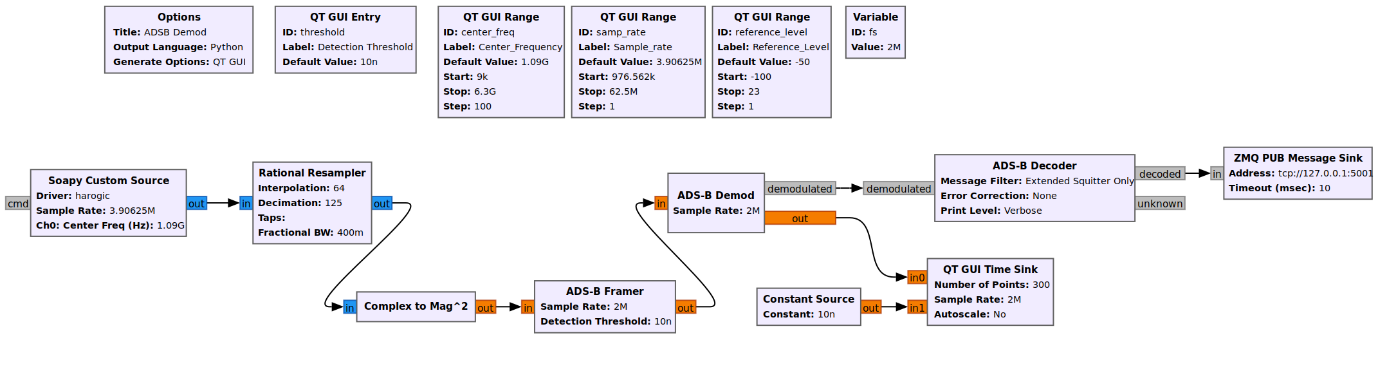
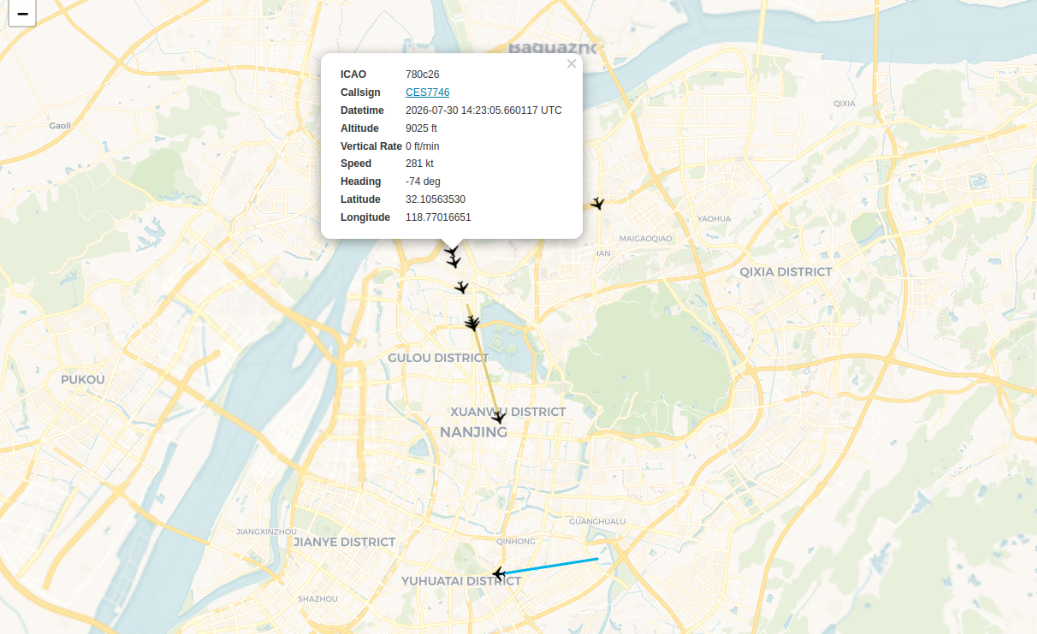
The input signal is an ADS-B signal centered at 1090 MHz. The output displays the demodulated ADS-B waveform and decodes aircraft information such as the ICAO address, callsign, altitude, speed, heading, and position. The decoded messages are transmitted to a web-based map, allowing users to monitor aircraft locations and flight information in real time.
3 Conclusion
By using the soapy-htra driver, HAROGIC receivers can be accessed through the standardized SoapySDR interface. Upper-layer applications can use common SoapySDR operations for device discovery, receiver configuration, and IQ data streaming, while the driver translates these operations into HAROGIC HTRA API calls.
This integration enables HAROGIC receivers to become standard SoapySDR devices that can be accessed through a unified interface by compatible SDR applications. It simplifies hardware integration, improves software portability, and allows developers to build SDR applications without relying on proprietary device APIs.
4 About HAROGIC
HAROGIC combines compact, robust, high-performance RF hardware with agile, intelligent software to help customers extend RF boundaries.
 Back to Cooperation